This guide explains how to set up and edit your business details in Bookeasy, including your property name, contact information, and address. Accurate business details are essential as some of this information will automatically display on your hosted booking engine, ensuring guests see correct and professional information when making reservations. Keeping these details current helps maintain consistency across your booking platforms.
1. Navigate to the left-hand menu (3 lines in the top left hand corner)
2. Click Setup > Business Details
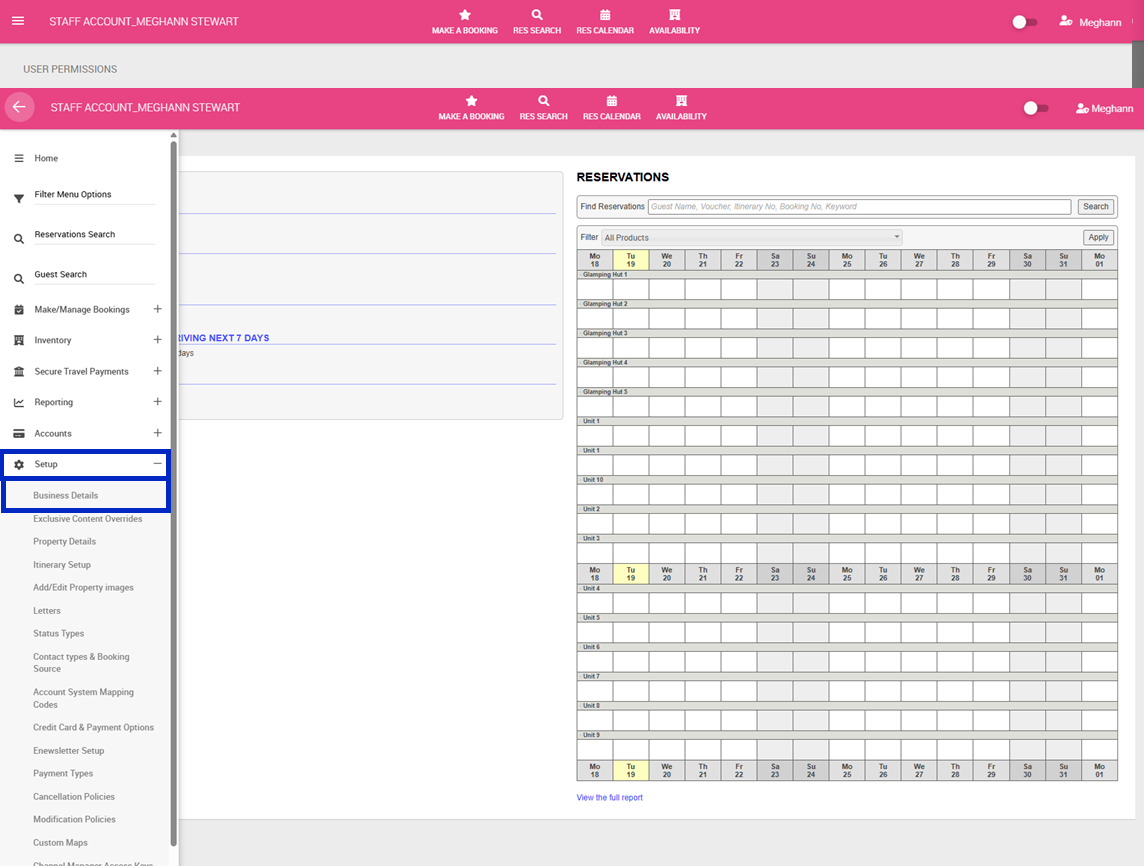
3. Complete the following:
| Field Name | Required | Character Limit | Appears On |
| Surname | No | 30 | Letters, Booking engine |
| First Name | No | 30 | Letters, Booking engine |
| Business Name | Yes | 50 | Booking engine, Itineraries, Letters, Invoices, Manifests, Email correspondence |
| Business Number Label | No | 20 | Invoices, Letters |
| ABN | No | 20 | Invoices, Letters |
| Yes | 50 | Letters, Email notifications, Booking confirmations | |
| Email Notifications | No | - | - |
| Website | No | 100 | Booking engine |
| Phone | No | 15 | Booking engine, Letters, Invoices |
| Postal Address | Yes | 50 | Letters, Invoices |
| Town | Yes | 20 | Letters, Invoices, Booking engine |
| Postcode | Yes | 15 | Letters, Invoices |
| Globalisation | No | - | - |
| Local Taxes | No | - | Invoices, Booking calculations |
| Business Location | Yes | - | Booking engine, Google Maps |
| Accommodation Type | No | Booking engine filters | |
| Location | No | Booking engine filters | |
| Opening Hours | No | 255 | Booking engine |
| Point of Difference | No | 5000 | TOP of your booking engine page |
| Directions from your nearest town | No | 5000 | Booking engine, Letters, Itineraries |
| Business Description | No | 5000 | Booking engine, Search listings |
| Bank Name | Yes | - | How you are paid for bookings by Bookeasy Visitor Centres and/or Bookeasy Marketplace |
| BSB Number | No | - | How you are paid for bookings by Bookeasy Visitor Centres and/or Bookeasy Marketplace |
| Account Number | Yes | - | How you are paid for bookings by Bookeasy Visitor Centres and/or Bookeasy Marketplace |
| Account Title (Account Name) | Yes | - | How you are paid for bookings by Bookeasy Visitor Centres and/or Bookeasy Marketplace |
| Account Code | No | - | |
| General Terms & Conditions | No (Recommend to complete) | 1000 | Booking engine, Booking confirmations, Itineraries, Letters to guests |
| Star Rating | No | - | Booking engine |
| Tourism Accreditation | No | - | Booking engine (badge) |
4. Click Save